


LAUNCH S2-2 Sensor Box 2 Channels Handheld Sensor Simulator and Tester Support the Vehicle Multimeter Function
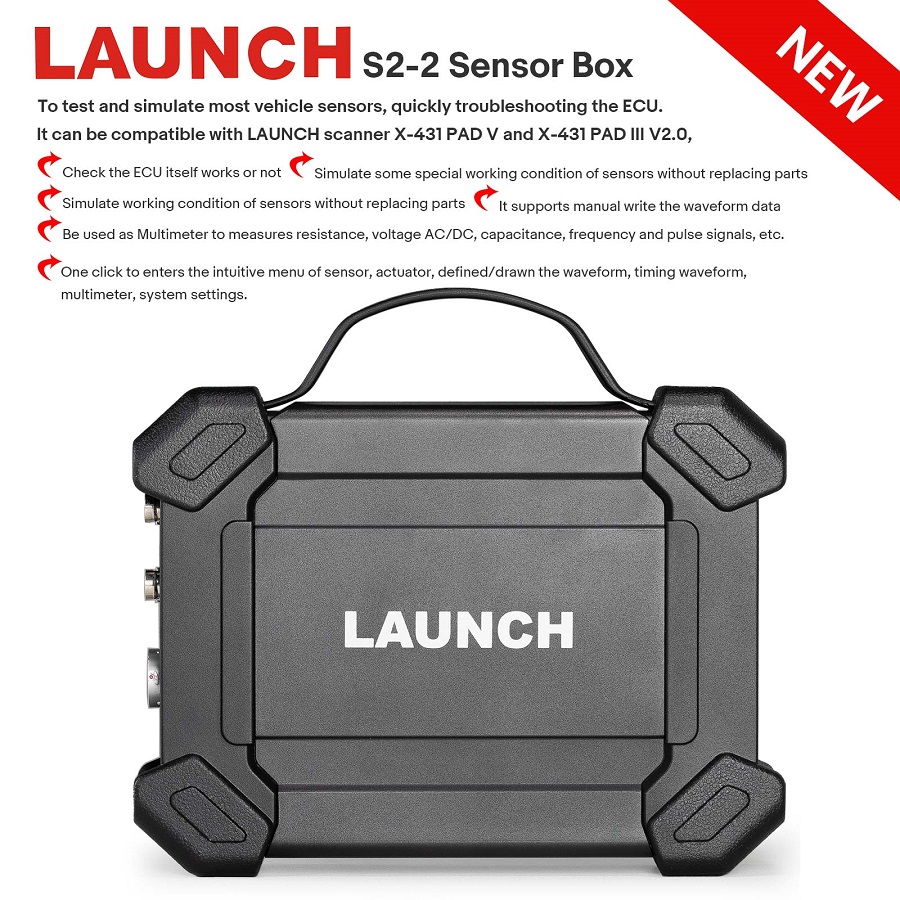
LAUNCH S2-2 Sensor box module is specially developed for diagnosing/testing/simulating most vehicle sensor faults. With its help, users can easily and quickly diagnose and simulate the sensor to rapidly troubleshoot the ECU.
At the same time, the LAUNCH S2-2 Sensor box module also supports the vehicle multimeter function. Through this function, users can test voltage, resistance, and capacitance. The function uses the same hardware device as the sensor module. The module cannot be used separately, and must be used together with Launch-specific diagnostic tools that are compatible with this module. It can be compatible with LAUNCH scanner X-431 PAD V and X-431 PAD III V2.0.
Development Backgrounds:
The sensor is the signal input device of the vehicle ECU. It converts vehicle operating parameters such as vehicle speed, coolant temperature, engine speed, air flow, and throttle opening into electrical signals and sends them to the vehicle ECU. Then, the vehicle ECU adjusts the engine running status to maintain the engine in optimal condition.
Product Features:
1. Check the ECU itself works or not.
2. It supports manually writing the waveform data.
3. Simulate working condition of sensors without replacing parts.
4. Simulate some special working condition of sensors without replacing parts.
5. Be used as a Multimeter to measures resistance, voltage AC/DC, capacitance, frequency and pulse signals, etc.
6. One click to enters the intuitive menu of sensor, actuator, defined/drawn the waveform, timing waveform, multimeter, system settings.
Product Functions:
LAUNCH S2-2 sensor box mainly includes "Sensor", "Actuator", "Defined/Drawn", and "Timing Waveform".
Sensor: Is used to simulate the input signals of the automobile electronic control system, and the automobile computer adjusts the running state of the engine according to these parameters.
Actuator: Is used to simulate the output control signal of automobile electronic control system, so as to judge the working conditions of automobile actuators such as idle motor, EGR solenoid valve, etc.
Multimeter: Through this function, users can test voltage, resistance, and capacitance.
Defined:
Waveform: There are 9 waveforms to choose; Forward sine wave, reverse sine wave, forward square wave, reverse square wave, medium voltage, straight line, high / low voltage straight line, triangle wave, and trapezoidal wave.
Frequency: Set the frequency of the selected waveform.
Amplitude: Set the amplitude of the selected waveform.
Offset: Set the offset of the selected waveform.
Phase: Set the phase of the selected waveform.
Duty cycle: Set the duty cycle of the selected waveform.
Signal sync: Can cause CH1 and CH2 to output signals at the same time.
Hand-drawn:
Total frame: 1-3 (optional). Indicate the total number of output points
Generally, one waveform is composed of 100 points. The values 1-3 indicate that you can select 100, 200, or 300 points to form a waveform.
Edit frame: You can edit a single frame or edit all
Waveform: You can select a preset waveform and place it in the hand-drawing area
Frequency: Frequency of a single frame (for 3-frame output, the total frequency is the set frequency/3)
Amplitude: Amplitude of the output waveform
Offset: Offset of the output waveform
Timing Waveform:
The function is used to match the timing waveform (crankshaft + camshaft) of the engine.
Technical Parameters:
Sensor Module:
Number of channels: 2
Precision: 1 %
Amplitude range: 0 – 20 V
Max output current: 20 mA
Predefined frequency range: 0 – 20 kHz
Square wave signal pulse frequency: 0 – 15 kHz
Square wave signal duty cycle: 0 – 100 %
Power supply: Simulator sensor output/max current 20mA (output is powered by battery) – Drive solenoid, ignition coil/output current 2A (external power supply)
USB: USB2.0 Type B (with charging and power supply function/5V)
DC voltage simulation: Support
Fixed frequency simulation: Support
Predefined waveform simulation: Support
Hand-drawn waveform simulation: Support
Signal generator interface: 2
External power supply port: 1
Solenoid interface: 1
Multimeter interface: 2
Working temperature: 0 °C – 50 °C
Storage temperature: -30 °C – 70 °C
Multimeter:
DC voltage: 0 V – 700 V
AC voltage: 0 V – 700 V
Resistance: 0 Ω – 40 MΩ
Capacitance: 0 F – 100 µF (maximum 30 s measurement time)
Diode: 0 V – 1,5 V
Continuity detection: Sounds below 30 Ω
Package Includes:
1pc x Sensor module
2ps x HT30 test leads
1pc x 7-pin interface adapter cable
1pc x Battery clamps cable
1pc x USB cable
3pcs x 6-way breakout lead
2pcs x Multimeter test pen (black + red - )
5pcs x Colored 4mm female probes
20pcs x Needles
1pc x Power adaptor
2pcs x Screw heads
1pc x User manual
1pc x Packing list
1pc x Box
Certificate Files
Official LAUNCH Authorized Dealer
Genuine LAUNCH diagnostic tools, reliable support and a more confident purchase experience.
We provide authentic LAUNCH products through authorized sales channels, with supported software updates, warranty service and professional technical assistance.
Why Buy from an Authorized LAUNCH Dealer?
Buying from an authorized dealer helps ensure your LAUNCH diagnostic tool is genuine, properly supported and eligible for official services.
100% Genuine Products
Authentic LAUNCH diagnostic tools sourced through authorized distribution channels.
Official Software Support
Access supported diagnostic software, vehicle coverage and available software updates.
Warranty Protection
Eligible products include warranty support according to the terms listed on each product page.
Professional Support
Get help with product selection, compatibility, setup, software updates and technical questions.
Official LAUNCH Authorization

Our authorization confirms that we are approved to distribute genuine LAUNCH diagnostic products through authorized sales channels.
Why Genuine LAUNCH Matters
Professional diagnostic tools depend on more than hardware. Genuine products provide access to supported software, valid device activation and reliable after-sales service.
Reliable Activation
Valid product identification and supported device activation.
Software & Vehicle Coverage
Access supported diagnostic software, vehicle data and available updates.
After-Sales Support
Receive assistance for eligible product, software and warranty needs.
Unauthorized or cloned devices may experience activation, update, compatibility or warranty limitations.
Support Before & After Your Purchase
Our team can assist throughout the entire purchase and ownership process.
Before Purchase
-
Vehicle compatibility
-
Diagnostic function confirmation
-
Product comparison
-
Accessory compatibility
After Purchase
-
Product activation
-
Software updates
-
Technical support
-
Warranty assistance
Buy LAUNCH with Confidence
Choose genuine LAUNCH diagnostic tools backed by reliable software support and professional service.
Genuine Products
Authentic LAUNCH tools and accessories.
Software Support
Supported software and vehicle coverage.
Professional Assistance
Help with compatibility, setup and product use.
Reliable After-Sales Service
Support when you need it after purchase.
Frequently Asked Questions
Are the LAUNCH products sold on this website genuine?
Yes. We provide genuine LAUNCH diagnostic products through authorized sales channels.
Do LAUNCH diagnostic tools include software updates?
Most eligible products include a free software update period. The exact update period varies by model.
Can you help confirm vehicle compatibility?
Yes. Provide your vehicle make, model, year and required diagnostic function, and our team can help check compatibility.
Do all LAUNCH products include the same warranty?
No. Warranty coverage may vary by product. Please refer to the warranty information listed on the corresponding product page.
Can you help with product activation?
Yes. Our support team can assist with general activation, registration and setup questions for eligible products.
✅ Fast order processing
You will receive the orders within 24 hours of payment confirmation (excluding weekends and public holidays). During peak seasons or holidays, processing times may be slightly extended. In the event of delays, we will take all necessary steps to minimize them.
To place an order, choose your region and click the link below:
-United States – https://us.launchx431pro.com/
-United Kingdom – https://uk.launchx431pro.com/
-European Union – https://www.launchx431pro.com/
✅ Local warehouses shipment
All orders are shipped from our warehouses in the USA, the United Kingdom, and Germany using premium international carriers to ensure your tools arrive safely and on time.
| Region | Shipping Location | Estimated Delivery Time |
| United States | PERTH AMBOY, NJ | 3–5 business days |
| United Kingdom | Dunstable | 3–5 business days |
| European | Ginsheim-Gustavsburg, Frankfurt | 3–7 business days |
| Other Countries | HongKong | 7–15 business days |
✅ Safe and reliable delivery
You can count on fast, dependable delivery. We work with trusted international carriers like DHL, UPS, USPS, FedEx, and DPD to get your order to you safely.
NOTE: Delivery to some remote or rural areas is not available. If you're unsure whether we ship to your location, feel free to contact our support team before placing your order.
✅ Free Shipping on Local Orders
Local orders (US, UK, EU) ship for free and with no tax.
For orders shipped to Canada or other non-local countries (excluding the US, UK, and EU), import taxes or customs duties may apply upon delivery.
✅ Customs & duties guidance
For customers outside Europe, customs fees are determined by your local government. As these charges vary by country and are beyond our control, we recommend contacting your local customs office before placing your order to understand any applicable fees, duties, or taxes.
✅ More shipment inquiries
For any shipping-related questions, our customer service team is here to help.
Email: ussupport@launchx431pro.com
WhatsApp: +86-180-2870-0839
Business hours: Monday–Friday, 9:00 AM – 6:00 PM (GMT+8)

Launch Upgrade Card (All Products)
Launch Software Update Card
Renew Your LAUNCH Software Update Service
Keep your compatible LAUNCH diagnostic tool up to date with the latest software, vehicle coverage, and available features.
Select your device model from the options above to purchase the corresponding software update service.
Important Notes
-
Digital Service — No Physical Shipping Required
This is a software update service only. No physical product will be shipped. -
Please Provide Your Serial Number After Purchase
After completing your order, email your device Serial Number (S/N) to:
ussupport@launchx431pro.com
You can usually find the S/N on the back of your device or in the device settings.
-
Processing Time
Software update activation is usually completed within 2 business days after we receive and verify your device information. -
Software Update Only
This service renews the software update period only and does not include hardware warranty coverage. -
Compatibility Confirmation Recommended
Please select the correct device model before purchase. If you are unsure which update option is compatible with your device, contact us with your model and serial number before ordering. -
Digital Product Policy
Due to the digital nature of this service, orders are non-refundable once the update service has been activated or delivered.
How It Works
Step 1 — Choose Your Device
Select the correct LAUNCH device model from the available options.
Step 2 — Complete Your Order
Place your order and complete payment online.
Step 3 — Send Us Your Serial Number
Email your device S/N to ussupport@launchx431pro.com together with your order number.
Step 4 — We Activate the Update Service
Our team will verify your information and activate the corresponding software update service.
Step 5 — Update Your Device
Once activated, connect your device to the internet and open the Software Update section to download the latest available software.
Why Renew Your Software?
Stay Up to Date
Access the latest available software and vehicle coverage for your device.
Expand Vehicle Coverage
Keep compatibility with newer supported vehicle models and systems.
Maintain Diagnostic Capability
Continue using updated diagnostic functions, service functions, and available software features.
No Shipping Required
The entire process is completed online.
Need Help Choosing the Right Update Option?
Not sure which update service fits your device?
Send us your:
Device Model
Serial Number (S/N)
Order Number, if already purchased
Email: ussupport@launchx431pro.com
We’ll help confirm the correct update option before activation.