


LAUNCH BST360 Bluetooth Car Battery Tester
launch bst360 car battery load tester 6v 12v automotive battery alternator tester for all batteries
BST360, Remain your vehicle battery in good condition!

LAUNCH BST360, suitable for technicians and on the go consumers, is safe to use with its anti-heat charateristics and preventionagainst backfire electrical sparks that can occur during electrical syste, diagnosis.
Features:
1. Real-time monitor the battery health status include.
2. Staring and charging system analysis to determine related faults/issues.
3. Allow the user to download test reports on their smartphones and diagnostic scan tools by Bluetooth wireless technology.
4. Portable and lightweight with compact and practical usability.
6 kinds of tests: Ripple Detection, Battery Test, Electric Current Test, Starter Test, Charging System Test, Voltage Test
Applicable battery types: 12V (Lead-acid battery, GEL battery and AGM battery)
Supported battery standards: CCA, BCI, CA, MCA, JIS, DIN, IEC, EN, SAE, GB
Compatible with LAUNCH X-431 scanners include X-431 PRO GT, X-431 PRO V4.0, X-431 PRO3 V4.0, X-431 PRO5, X-431 PAD III V2.0, X-431 PAD V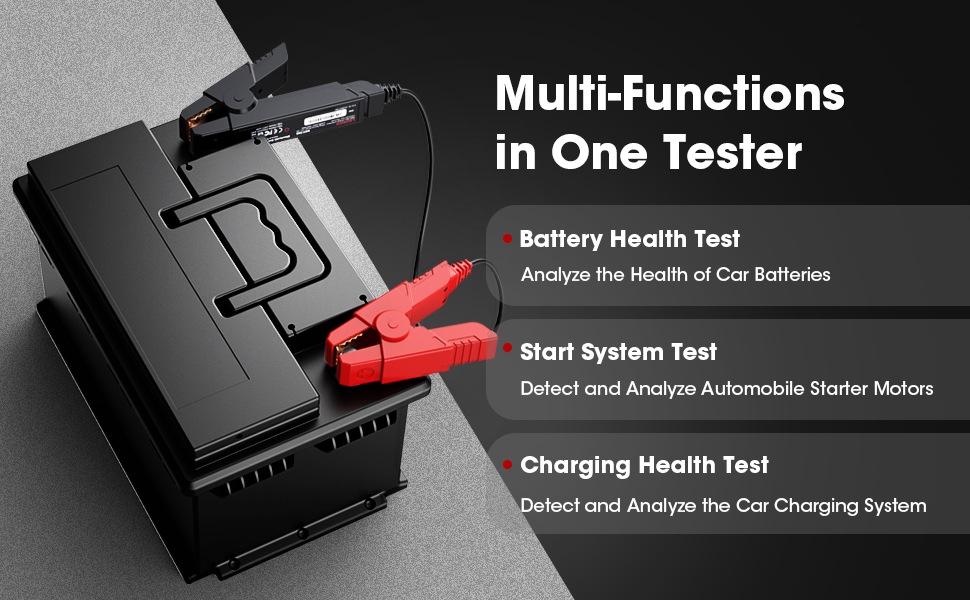
LAUNCH BST360 Bluetooth Car Battery Tester
launch bst360 car battery load tester 6v 12v automotive battery alternator tester for all batteries
3 Main Functions Supported by Launch Battery Tester BST-360
Launch 12V battery checker tester BST360 has the following three main functions. Multiple battery testing can be done by one tester tool.
Battery Health Test: This function is used to test the health status of car batteries. The battery checker tester can calculate the actual cold-start capacity of the batteries, determine the aging degree of the batteries, and provide a reliable analysis basis for the inspection and maintenance of the car batteries.
Start System Test: This function is to detect the status of automobile starter motors by checking the actual starting current and the starting voltage of the starter motor.
Charging Health Test: This function is to inspect the car charging system with the automotive battery tester. The system includes generators, rectifiers, rectifier diodes, etc. Through testing, you can know whether the output voltage of the generator, the rectifier diode, and the charging current are normal.
LAUNCH BST360 Bluetooth Car Battery Tester
launch bst360 car battery load tester 6v 12v automotive battery alternator tester for all batteries
12V Battery Load Tester For All Kinds of Batteries
Applicable Vehicles: Motorcycles, Cars, Trucks, Boats, RVs
Applicable Battery Types: 12V Lead-Acid, Regular Flooded, AGM Plate, GEL, EFP batteries
Supported Battery Standards: CCA, BCI, CA, MCA, JIS, DIN, IEC, EN, SAE, GB
LAUNCH BST360 Bluetooth Car Battery Tester
launch bst360 car battery load tester 6v 12v automotive battery alternator tester for all batteries
Perform Tests in Unconstrained Way with Automotive Battery Tester
Characteristics owned by the 12V battery load tester BST360 such as in-vehicle and out-of-vehicle test, plug &on, heat-resistance design, Bluetooth connection effectively improve the service level and user satisfaction of the vehicle repair shops, bring great convenience to battery manufacturers and distributors, and car owners who would like to do battery tests by themselves.
In-Vehicle & Out-of-Vehicle: Car Battery Tester BST360 supports both in-vehicle and out-of-vehicle testing so that you can choose the testing environment by yourself and do not have to be restricted.
Plug & On: The steps for 12 V car battery tester BST360 usage are very simple and clear, which makes the battery test can be completed anytime and anywhere. Not only professional maintenance technicians but also individual car owners can quickly get started. Besides, the portable and lightweight design makes this battery tester tool easy to store.
Heat-Resistance, No Spark: Launch 12V tester BST-360 is safe to use with its anti-heat characteristics and prevention against backfire electrical sparks that can occur during electrical system diagnosis. Reliable technology ensures absolute safety during use.
Bluetooth (in App) Connection: Bluetooth capability of this car battery tester allows for seamless sync with smartphones and X-431 diagnostic scan tools. You just need to install and open the BST360 application on your phone or X-431 diagnostic scanner and click the test you would like to do, and the app will automatically detect and establish the Bluetooth connection.
Note: The Bluetooth here refers to the built-in Bluetooth in the BST360 app instead of the Bluetooth in your mobiles or diagnostic tools.
LAUNCH BST360 Bluetooth Car Battery Tester
launch bst360 car battery load tester 6v 12v automotive battery alternator tester for all batteries
Support Use with Multi-Devices and Multi-Languages
Multi-Devices: Launch 12 V car battery tester BST360 can be used with a variety of devices, whether it is your X431 diagnostic device (such as X431 V+, X-431 PROS V4.0, X431 PRO5, X431 PAD III V2.0, X431 PAD V), or your Android /iPhone mobile, you can directly connect the battery tester with your device through a few steps. Launch BST360 saves you the trouble of considering compatibility and tedious pairing issues.
Multi-Languages: This Launch battery tester also supports up to 9 languages (Chinese, English, German, French, Russian, Italian, Japanese, Spanish, Portuguese). The wide compatibility makes this automotive car battery tester the premier choice for mechanics.
How to Setup this Launch Battery Tester?
Step1: Connect the battery tester BST360 to the car battery.
Before testing, clasp the red clip to the positive terminal of the battery (+), and then clasp the black clip to the negative terminal of the battery (-).
Step2: Open the application interface.
Launch Scanner: Enter the BST360 module
Smart Phone: Download and install the BST360 app
Step3: Click one test, and the Bluetooth would automatically connect.
*Notice:
1. After connection, the indicator light on the battery clamp should be on.
2. To test the accuracy, please clamp the clip on the positive and negative poles of the battery instead of the screws connecting the positive and negative poles.
How to Perform 3 Main Battery Test Functions on BST360?
Battery Health Test: 1. Click the battery health test. 2. Connect the Bluetooth in the BST360 application. 3. Choose the type of battery that needs to be tested. 4. The test result displays.
Start System Test: 1. Click the start system test. 2. Connect the Bluetooth in the BST360 application. 3. Make sure that the vehicle and all electrical components (air conditioners, lights, radios, etc.) are turned off and click [OK]. 4. Start the engine according to the instructions on the screen. 5. After start-up is complete, the screen will display the voltage test result.
Note: If the floating charge is detected, please turn on the headlights to remove it.
Charging Health Test: 1. Click the start system test. 2. Connect the Bluetooth in the BST360 application. 3. Start the engine and start charging until it detects that the charging voltage and ripple are normal. 4. Follow the instructions to step on the accelerator to increase the engine speed to 2500 rpm and hold for 5 seconds. 5. The test result displays.
T
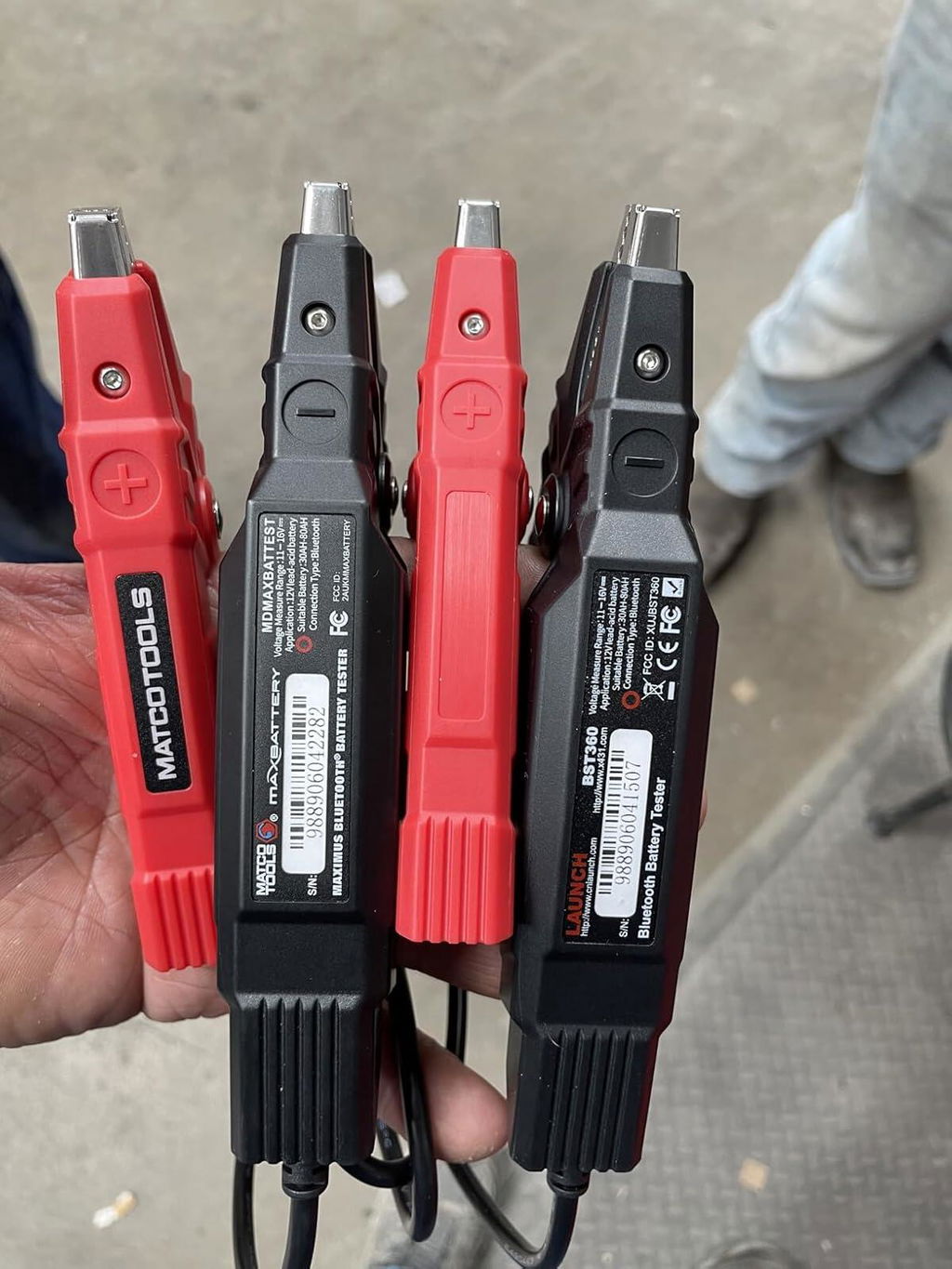
This tester is great. Works with the x431 tools or the app, and it works well. Super easy to use- connect to the tester in the app, select your test parameters, select your CCA and follow the instructions. Tests battery, monitors voltage during crank, and tests alternator. Excellent value for the money- this tester was $50, my coworker bought the Matco version that’s literally just a rebadged Launch, and he paid $140.
A
This was such a great addition to the computer we are so happy with it
B
easy to use
C
Works very well! Not one single issue yet. Diagnosed 20 batteries laying around and multiple in the cars around my shop
C
Love these!! So easy to use and give u all the information you need.
J
Cool
G
I have a stand alone battery analyzer that's a lot faster to use, but when doing other OBDII testing diagnostics, it works GREAT with the X-431 Elite I bought also!
K
The battery tester works well and is easy to use.
D
great product
J
Good
L
good one at this price
F
Pretty accurate tester
S
Very accurate tester gets me quick answers all the time
A
I use this almost daily and sometimes multiple times a day. Works good with my phone to check batteries. Connects fast via Bluetooth. I have a couple apps I use with it, Launch BT360 and Thinkeasy. I tend to use the Thinkeasy more often because I prefer the layout and overall functions and feel of the app. I find it easier to edit the battery test files in the Thinkeasy app where I can actually list the tests by vin. Listing by vin so I can access at a later date.
A
Excellent little battery tester. Highly recommended
R
Easy to use! Before those I got big Bosch device it’s very heavy and big. But right now I got this thing and it’s pretty good extend of my launch options.Defiantly recommend.
E
I found my car had a malfunction in its electrical system not long ago. So I checked my car battery with a digital multimeter and everything showed normal. This confused me. I found various ways to solve the car battery online.As a loyal customer of Launch, I guess the bst360 bluetooth car battery tester meets my needs. That is compatible with my Launch X431 pro 3s+ scan tool and phone.Just easily connect it to the battery and I will know that my battery is useless.Perfect. User friendly.
C
There was a promotion when ordering my Launch x431 scanner, and this came along with it! It was very easy to hook up to test your battery and charging system! I like how I can use my phone or my scanner when using this product! The customer service is excellent, Doris helped me resolve an issue in a fast timely manner, would definitely order from this company again!
C
Love it! Easy to use and Matco sells the same thing but 50$ more. Can’t beat it
T
This tester is great. Works with the x431 tools or the app, and it works well. Super easy to use- connect to the tester in the app, select your test parameters, select your CCA and follow the instructions. Tests battery, monitors voltage during crank, and tests alternator. Excellent value for the money- this tester was $50, my coworker bought the Matco version that’s literally just a rebadged Launch, and he paid $140.
A
This was such a great addition to the computer we are so happy with it
B
easy to use
C
Works very well! Not one single issue yet. Diagnosed 20 batteries laying around and multiple in the cars around my shop
C
Love these!! So easy to use and give u all the information you need.
J
Cool
G
I have a stand alone battery analyzer that's a lot faster to use, but when doing other OBDII testing diagnostics, it works GREAT with the X-431 Elite I bought also!
K
The battery tester works well and is easy to use.
D
great product
J
Good
L
good one at this price
F
Pretty accurate tester
S
Very accurate tester gets me quick answers all the time
A
I use this almost daily and sometimes multiple times a day. Works good with my phone to check batteries. Connects fast via Bluetooth. I have a couple apps I use with it, Launch BT360 and Thinkeasy. I tend to use the Thinkeasy more often because I prefer the layout and overall functions and feel of the app. I find it easier to edit the battery test files in the Thinkeasy app where I can actually list the tests by vin. Listing by vin so I can access at a later date.
A
Excellent little battery tester. Highly recommended
R
Easy to use! Before those I got big Bosch device it’s very heavy and big. But right now I got this thing and it’s pretty good extend of my launch options.Defiantly recommend.
E
I found my car had a malfunction in its electrical system not long ago. So I checked my car battery with a digital multimeter and everything showed normal. This confused me. I found various ways to solve the car battery online.As a loyal customer of Launch, I guess the bst360 bluetooth car battery tester meets my needs. That is compatible with my Launch X431 pro 3s+ scan tool and phone.Just easily connect it to the battery and I will know that my battery is useless.Perfect. User friendly.
C
There was a promotion when ordering my Launch x431 scanner, and this came along with it! It was very easy to hook up to test your battery and charging system! I like how I can use my phone or my scanner when using this product! The customer service is excellent, Doris helped me resolve an issue in a fast timely manner, would definitely order from this company again!
C
Love it! Easy to use and Matco sells the same thing but 50$ more. Can’t beat it
Certificate Files
Official LAUNCH Authorized Dealer
Genuine LAUNCH diagnostic tools, reliable support and a more confident purchase experience.
We provide authentic LAUNCH products through authorized sales channels, with supported software updates, warranty service and professional technical assistance.
Why Buy from an Authorized LAUNCH Dealer?
Buying from an authorized dealer helps ensure your LAUNCH diagnostic tool is genuine, properly supported and eligible for official services.
100% Genuine Products
Authentic LAUNCH diagnostic tools sourced through authorized distribution channels.
Official Software Support
Access supported diagnostic software, vehicle coverage and available software updates.
Warranty Protection
Eligible products include warranty support according to the terms listed on each product page.
Professional Support
Get help with product selection, compatibility, setup, software updates and technical questions.
Official LAUNCH Authorization

Our authorization confirms that we are approved to distribute genuine LAUNCH diagnostic products through authorized sales channels.
Why Genuine LAUNCH Matters
Professional diagnostic tools depend on more than hardware. Genuine products provide access to supported software, valid device activation and reliable after-sales service.
Reliable Activation
Valid product identification and supported device activation.
Software & Vehicle Coverage
Access supported diagnostic software, vehicle data and available updates.
After-Sales Support
Receive assistance for eligible product, software and warranty needs.
Unauthorized or cloned devices may experience activation, update, compatibility or warranty limitations.
Support Before & After Your Purchase
Our team can assist throughout the entire purchase and ownership process.
Before Purchase
-
Vehicle compatibility
-
Diagnostic function confirmation
-
Product comparison
-
Accessory compatibility
After Purchase
-
Product activation
-
Software updates
-
Technical support
-
Warranty assistance
Buy LAUNCH with Confidence
Choose genuine LAUNCH diagnostic tools backed by reliable software support and professional service.
Genuine Products
Authentic LAUNCH tools and accessories.
Software Support
Supported software and vehicle coverage.
Professional Assistance
Help with compatibility, setup and product use.
Reliable After-Sales Service
Support when you need it after purchase.
Frequently Asked Questions
Are the LAUNCH products sold on this website genuine?
Yes. We provide genuine LAUNCH diagnostic products through authorized sales channels.
Do LAUNCH diagnostic tools include software updates?
Most eligible products include a free software update period. The exact update period varies by model.
Can you help confirm vehicle compatibility?
Yes. Provide your vehicle make, model, year and required diagnostic function, and our team can help check compatibility.
Do all LAUNCH products include the same warranty?
No. Warranty coverage may vary by product. Please refer to the warranty information listed on the corresponding product page.
Can you help with product activation?
Yes. Our support team can assist with general activation, registration and setup questions for eligible products.
✅ Fast order processing
You will receive the orders within 24 hours of payment confirmation (excluding weekends and public holidays). During peak seasons or holidays, processing times may be slightly extended. In the event of delays, we will take all necessary steps to minimize them.
To place an order, choose your region and click the link below:
-United States – https://us.launchx431pro.com/
-United Kingdom – https://uk.launchx431pro.com/
-European Union – https://www.launchx431pro.com/
✓ Local warehouse dispatch
✅ Local warehouses shipment
All orders are shipped from our warehouses in the USA, the United Kingdom, and Germany using premium international carriers to ensure your tools arrive safely and on time.
| Region | Shipping Location | Estimated Delivery Time |
| United States | PERTH AMBOY, NJ | 3–5 business days |
| United Kingdom | Dunstable | 3–5 business days |
| European | Ginsheim-Gustavsburg, Frankfurt | 3–7 business days |
| Other Countries | HongKong | 7–15 business days |
✅ Safe and reliable delivery
You can count on fast, dependable delivery. We work with trusted international carriers like DHL, UPS, USPS, FedEx, and DPD to get your order to you safely.
NOTE: Delivery to some remote or rural areas is not available. If you're unsure whether we ship to your location, feel free to contact our support team before placing your order.
✅ Free Shipping on Local Orders
Local orders (US, UK, EU) ship for free and with no tax.
For orders shipped to Canada or other non-local countries (excluding the US, UK, and EU), import taxes or customs duties may apply upon delivery.
✅ Customs & duties guidance
For customers outside Europe, customs fees are determined by your local government. As these charges vary by country and are beyond our control, we recommend contacting your local customs office before placing your order to understand any applicable fees, duties, or taxes.
✅ More shipment inquiries
For any shipping-related questions, our customer service team is here to help.
Email: ussupport@launchx431pro.com
WhatsApp: +86-180-2870-0839
Business hours: Monday–Friday, 9:00 AM – 6:00 PM (GMT+8)
Company: Shenzhen Zhanhongye Electronic Technology Co., Ltd.
Address: Room 1901F3, Hengfang Technology Building, No. 4008, Xinhu Road, Yongfeng Community, Xixiang Street, Baoan District, Shenzhen City

Launch Upgrade Card (All Products)
NOTE:
- 1. Please email us ussupport@launchx431pro.com with your Serial Number(S/N) after payment. The S/N is on the back of your device.
- 2. Very Easy to Operate, No Need Shipping.
- 3. It will take 2 working days to be updated.
- 4. Only for Software Update, without Hardware Warranty.
- 5. Due to the digital nature of virtual cards, all sales are final and non-refundable once sent or activated. Please double-check your order details before purchase. We will also send a verification reminder, and you may need to confirm your order within the specified timeframe prior to delivery. For any technical issues, kindly contact our support team for assistance.
Launch X431 V/ X431 V+/Pros Mini / PAD V/ PAD VII One Year Update Service
You software of X431 V and X431 V+ has been outdated? Want to update it??
Now to save your money, we provide one year update service for all customer who have X431 V, X431 V+ / PAD V/ PAD VII and the free update service has been expired.
How to make it work?
1. After you place an order on our website and check out, please email us via ussupport@launchx431pro.com and provide us your device serial number.
2. We will open one year update authorization for you.
3. The Launch technician will open the update service online, no need shipment.
4. then you can go back to homepage of your X431 V/ X431 V+ / PAD V/ PAD VII and click "Update" to download new update.
Return policy
Our goal is for every customer to be totally satisfied with their purchase. If this isn't the case, let us know and we'll do our best to work with you to make it right.
Shipping
We will work quickly to ship your order as soon as possible. Once your order has shipped, you will receive an email with further information. Delivery times vary depending on your location.
Manufacturing
Our products are manufactured both locally and globally. We carefully select our manufacturing partners to ensure our products are high quality and a fair value.